

Lark
0.0.3
Lark is a productivity superapp for teams. Get chat, docs, meetings, workflow automations & AI for free all in one place.
langgenius/lark_trigger2610 installs
Lark Trigger Plugin User Guide
What This Plugin Does
The Lark Trigger plugin connects your Dify workflows with Lark (Feishu) events. When something happens in your Lark workspace - like receiving a message, creating a file, or joining a meeting - this plugin automatically starts your Dify workflows to respond to these events.
Getting Started
Step 1: Set Up Your Lark App
- Go to the Lark Open Platform and create a new app
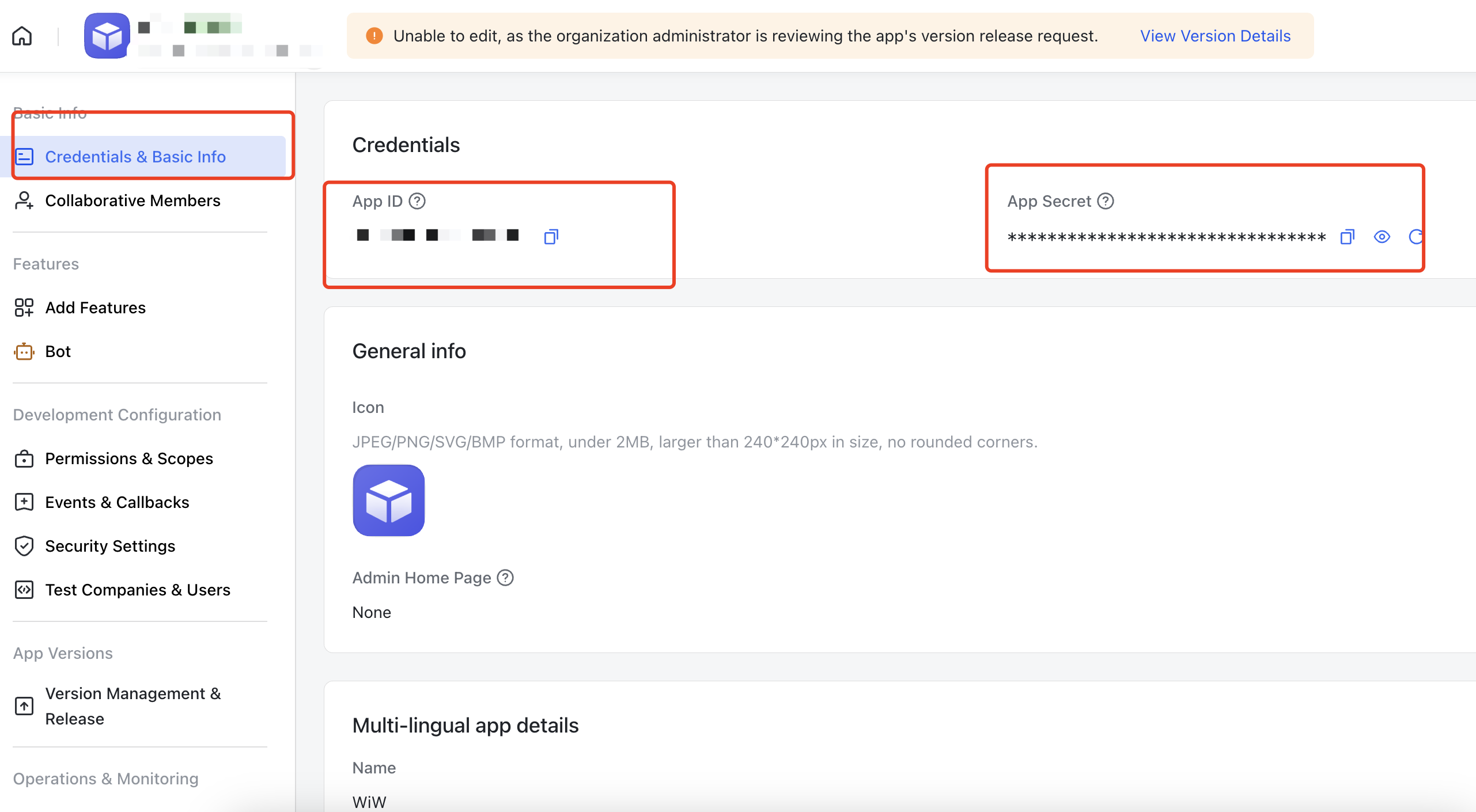
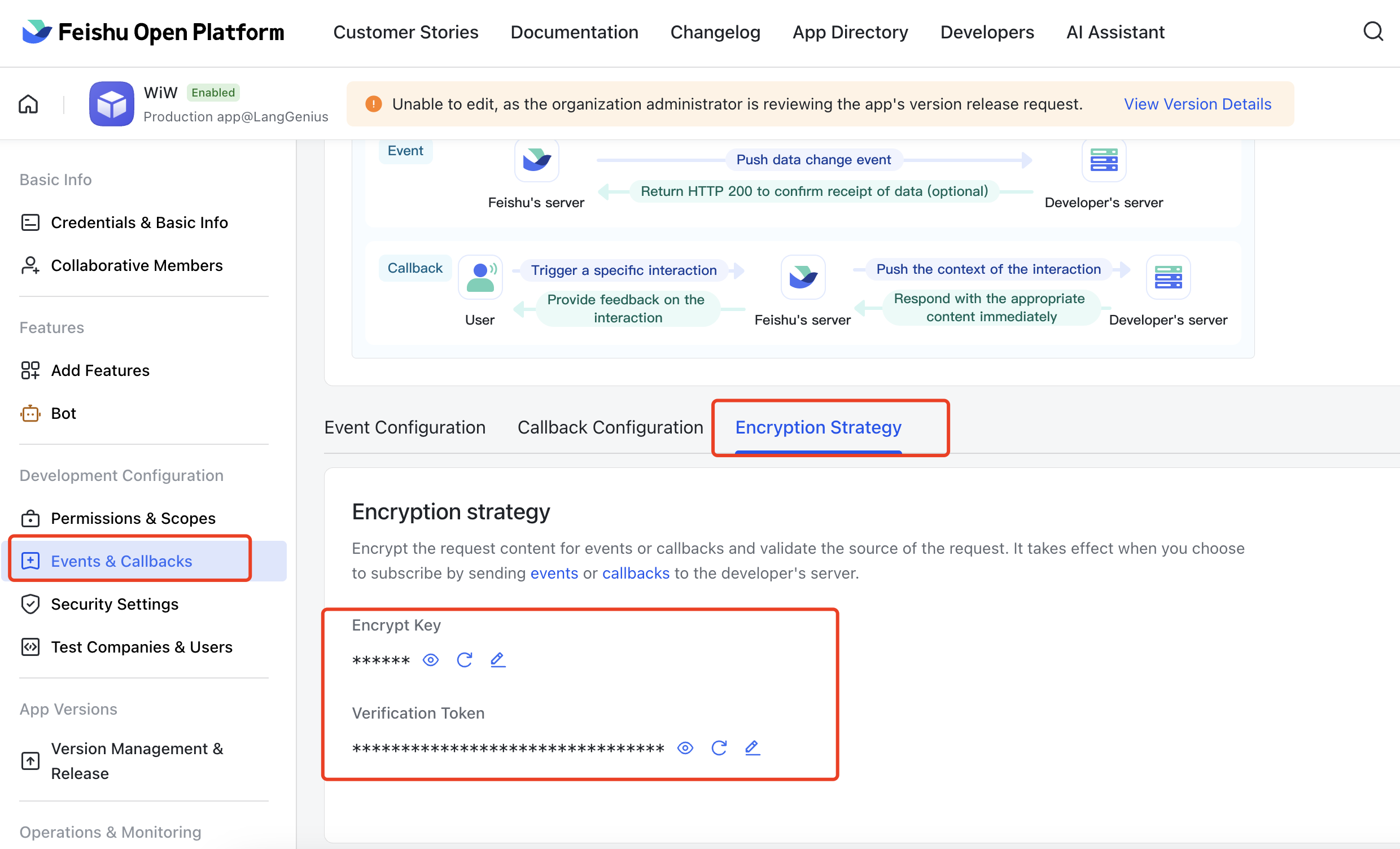
- In your app settings, find and save these four pieces of information:
- App Credentials: Could be found in section
- App ID: A unique identifier for your app
- App Secret: Your app's password (keep this secure!)
- Event Subscriptions: Could be found in section
- Encrypt Key: Used to encrypt the event data, it's optional in Lark, but we require it in this Plugin
- Verification Token: Used to confirm events are really from Lark
- App Credentials: Could be found in section
Step 2: Configure Event Subscriptions in Both Lark and Dify
- Return to your Dify plugins page and find the "Lark Trigger" plugin, you will find section after clicking the plugin
- Fill in the credentials you got from Lark
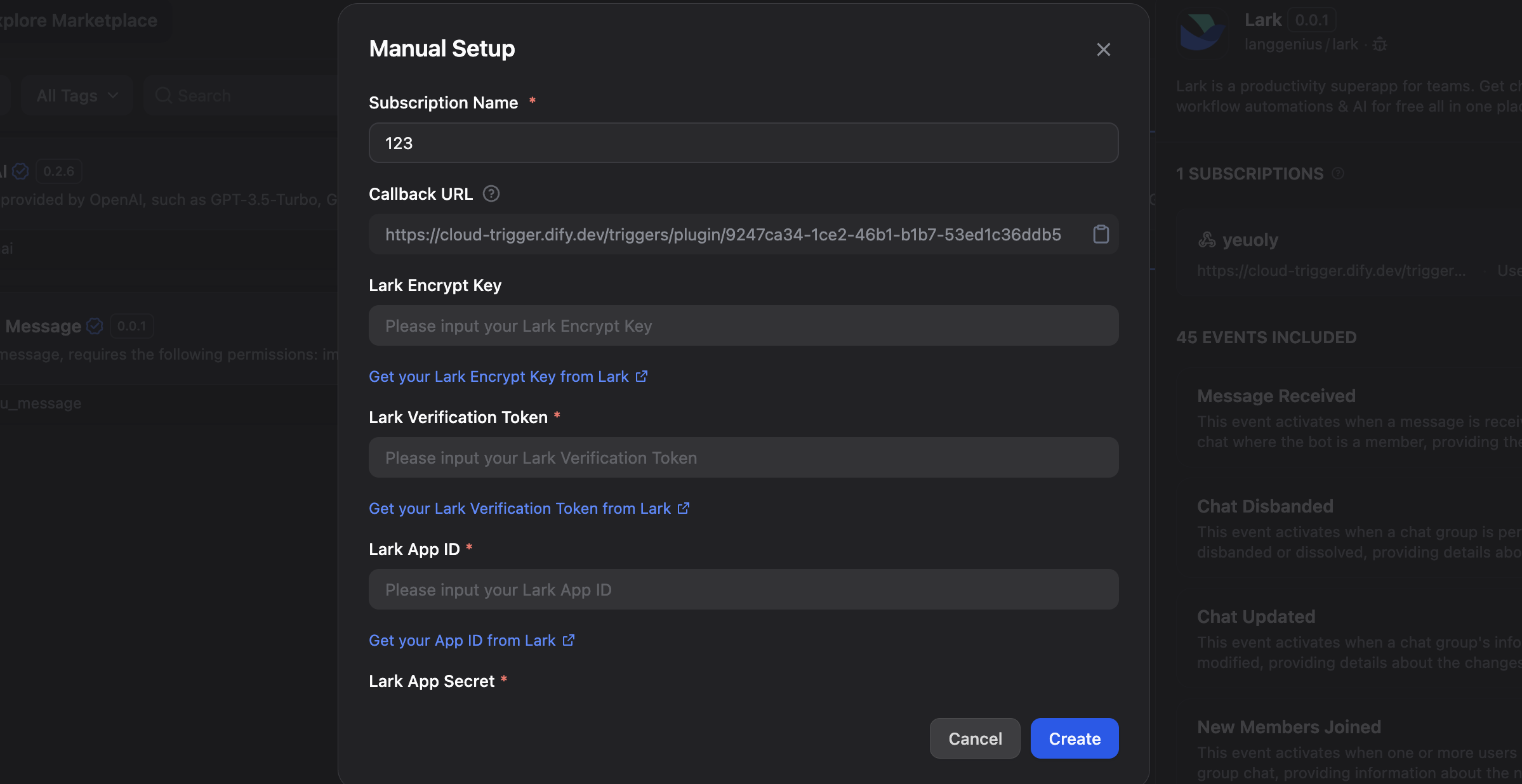
- Attention: copy the appeared here, and scroll down to the bottom of the dialog, is what we need to check later.
- Go to your Lark app settings, and find section, and set your Request URL to the you got from Dify.
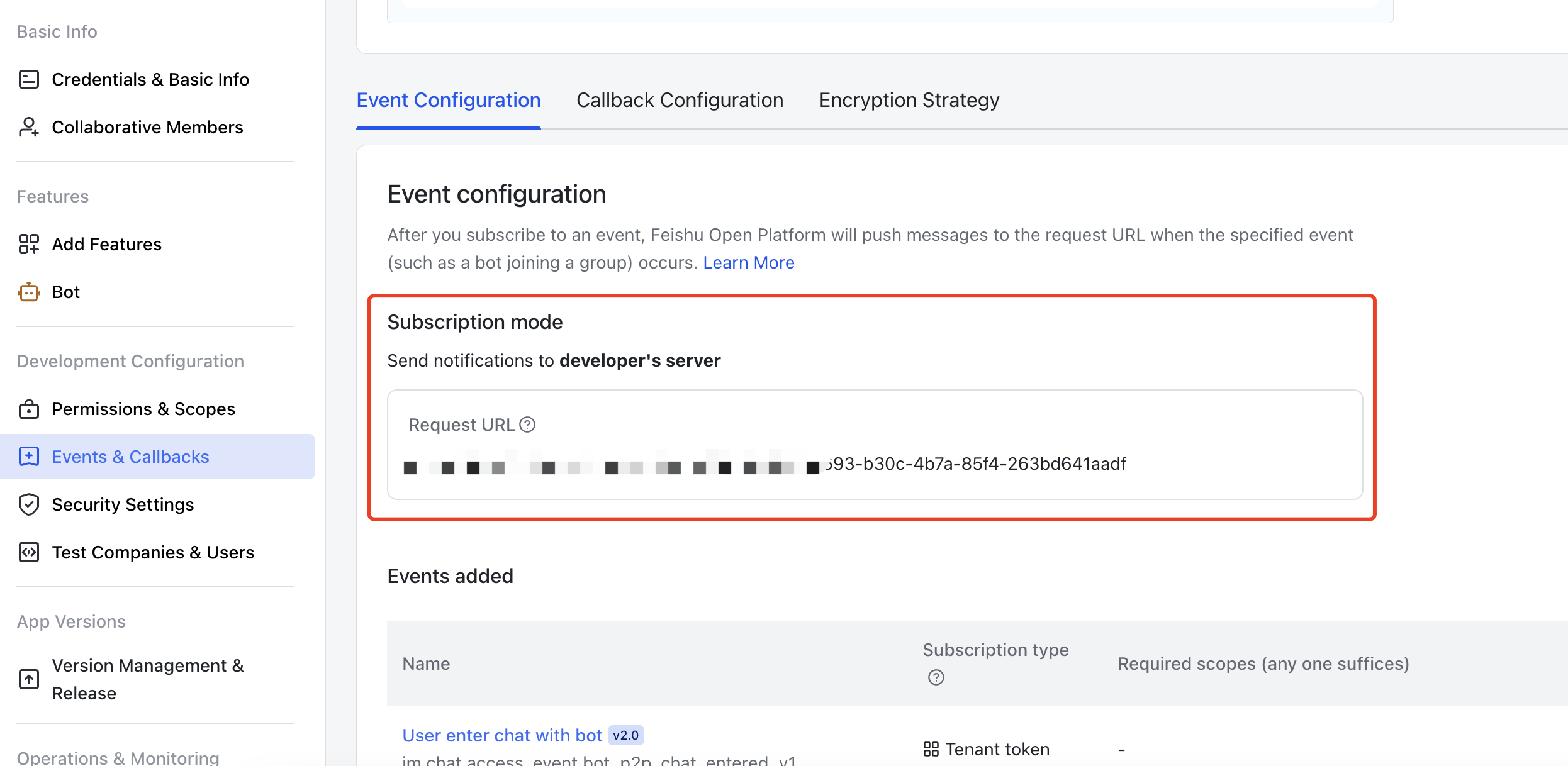
- The final step, save your Lark app settings, a test request is going to be sent to your Dify workspace, you can see the request in the section we mentioned before.
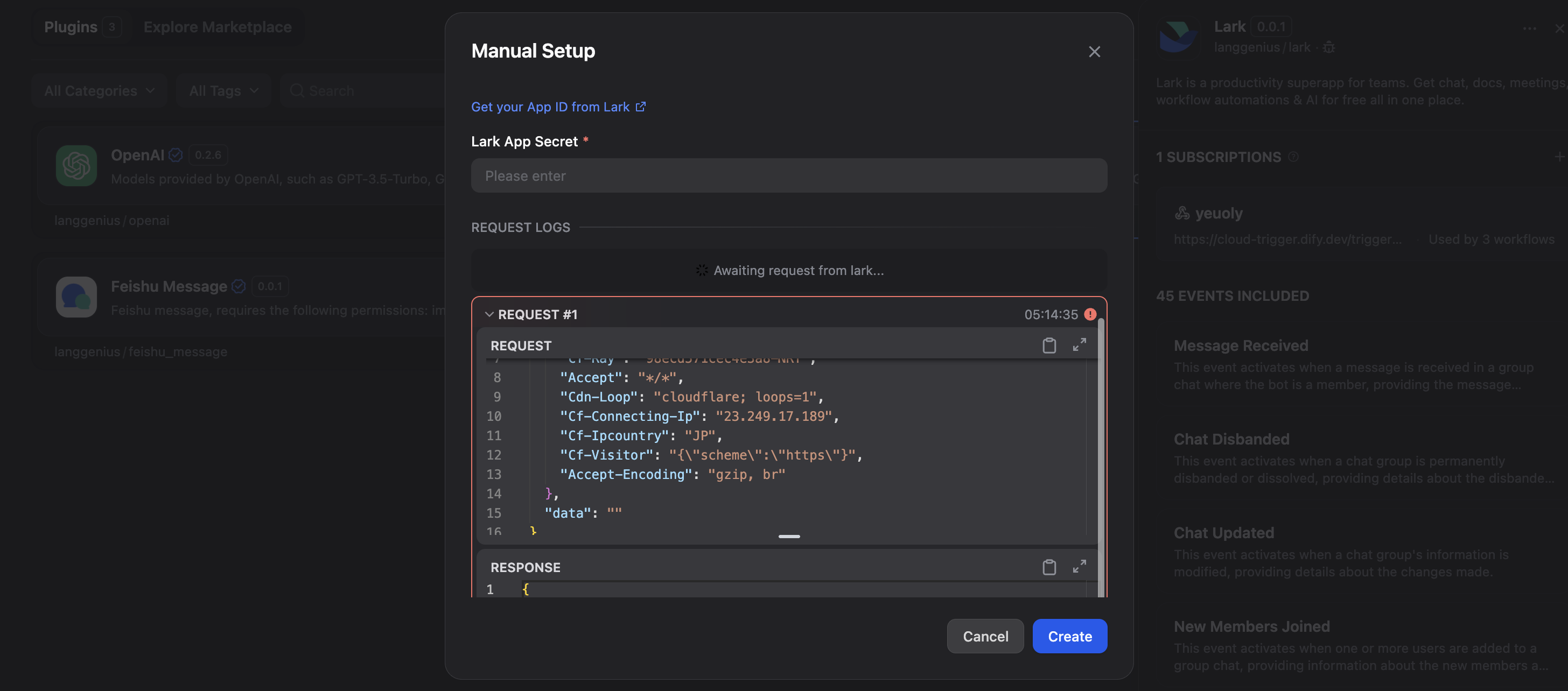
- It's a failure example in the screenshot, but don't worry, you will get a success message if you follow the steps correctly, just click button to save your settings.
Step 3: Use it in your Dify workflows
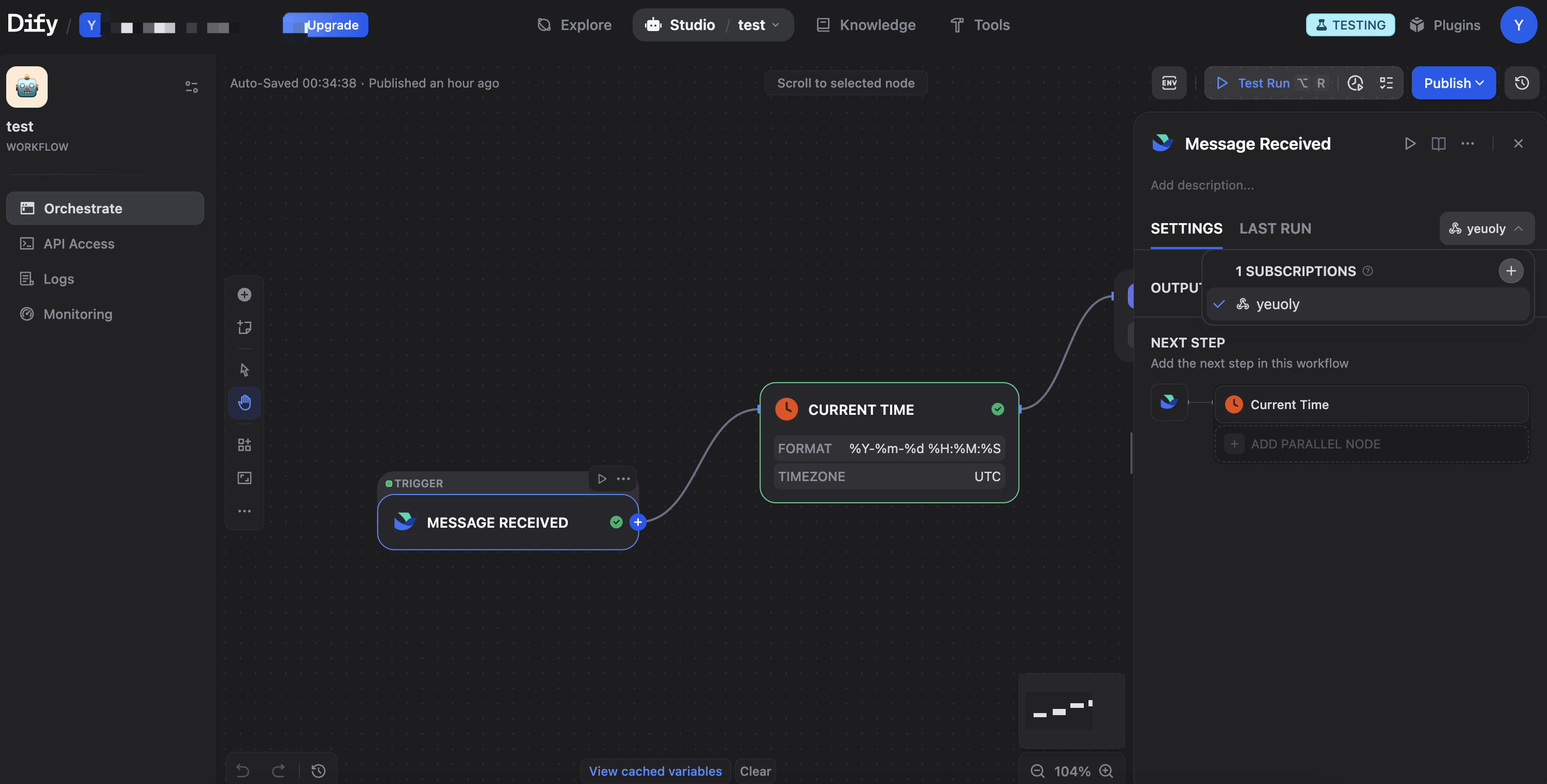
Never forget to select the right subscriptions and events.
Available Events
Messages & Chat (IM)
Message Receive ()
- What triggers it: Any new message in a chat where your bot is present
- What you get: Message content, sender details, chat information, message type
- Example use: Auto-reply bots, message logging, keyword detection
Message Read ()
- What triggers it: When users read messages
- What you get: Reader information, message IDs, read timestamps
- Example use: Read receipts tracking, engagement analytics
Message Recalled ()
- What triggers it: When a message is withdrawn/recalled
- What you get: Recalled message ID, recall time, operator details
- Example use: Audit trails, compliance monitoring
Message Reaction Added ()
- What triggers it: When someone adds an emoji reaction to a message
- What you get: Reaction type, message ID, reactor information, action time
- Example use: Sentiment analysis, poll tracking, engagement metrics
Message Reaction Deleted ()
- What triggers it: When someone removes an emoji reaction
- What you get: Removed reaction details, message ID, operator information
- Example use: Reaction change tracking, updated sentiment analysis
Chat Updated ()
- What triggers it: When chat group information changes
- What you get: Updated chat details, change type, operator information
- Example use: Group settings monitoring, compliance tracking
Chat Disbanded ()
- What triggers it: When a chat group is disbanded/deleted
- What you get: Chat ID, disband time, operator details
- Example use: Archive management, cleanup workflows
Chat Member User Added ()
- What triggers it: When users are added to a group chat
- What you get: New member list, chat details, operator information
- Example use: Welcome messages, access provisioning
Chat Member User Removed ()
- What triggers it: When users are removed from a group chat
- What you get: Removed users list, chat details, operator information
- Example use: Access revocation, farewell messages
Chat Member User Withdrawn ()
- What triggers it: When a user voluntarily leaves a group chat
- What you get: User details, chat information, leave time
- Example use: Exit surveys, membership tracking
Chat Member Bot Added ()
- What triggers it: When a bot is added to a group chat
- What you get: Bot details, chat information, operator details
- Example use: Bot initialization, configuration setup
Chat Member Bot Deleted ()
- What triggers it: When a bot is removed from a group chat
- What you get: Bot details, chat information, operator details
- Example use: Cleanup tasks, data archival
Files & Documents (Drive)
File Created ()
- What triggers it: When a new file or document is created
- What you get: File details, creator information, file type, location
- Example use: Auto-categorization, backup creation
File Edit ()
- What triggers it: When a file is edited
- What you get: File details, editor information, edit timestamp
- Example use: Version tracking, change notifications
File Read ()
- What triggers it: When a file is accessed or viewed
- What you get: File details, reader information, access time
- Example use: Access logging, popularity tracking
File Deleted ()
- What triggers it: When a file is deleted
- What you get: File details, deletion operator, delete time
- Example use: Recovery workflows, audit logging
File Trashed ()
- What triggers it: When a file is moved to trash
- What you get: File details, operator information, trash time
- Example use: Trash monitoring, recovery reminders
File Title Updated ()
- What triggers it: When a file's title is changed
- What you get: Old and new titles, file details, operator information
- Example use: Name change tracking, search index updates
File Permission Member Added ()
- What triggers it: When sharing permissions are granted
- What you get: New member details, permission level, file information
- Example use: Access monitoring, security alerts
File Permission Member Removed ()
- What triggers it: When sharing permissions are revoked
- What you get: Removed member details, file information, operator details
- Example use: Access audit, permission cleanup
Bitable Field Changed ()
- What triggers it: When a field/column in a bitable is modified
- What you get: Table details, field changes, operator information
- Example use: Schema tracking, database synchronization
Bitable Record Changed ()
- What triggers it: When a record in a bitable is created/updated/deleted
- What you get: Record details, change type, table information
- Example use: Data synchronization, change tracking
Calendar
Calendar Changed ()
- What triggers it: When calendar properties are modified
- What you get: Calendar details, changed properties, operator information
- Example use: Settings synchronization, audit trails
Calendar ACL Created ()
- What triggers it: When users gain access to a calendar
- What you get: Granted permissions, recipient details, calendar information
- Example use: Access provisioning, permission tracking
Calendar ACL Deleted ()
- What triggers it: When calendar access is revoked
- What you get: Revoked permissions, affected users, calendar details
- Example use: Access cleanup, security monitoring
Event Changed ()
- What triggers it: When a calendar event is created/updated/deleted
- What you get: Event details, change type, attendee list
- Example use: Meeting reminders, schedule synchronization
Organization & People (Contact)
User Created ()
- What triggers it: When a new user is added to the organization
- What you get: User profile, department, contact information
- Example use: Onboarding automation, account provisioning
User Updated ()
- What triggers it: When user information is modified
- What you get: Updated fields, user details, change timestamp
- Example use: Profile synchronization, change notifications
User Deleted ()
- What triggers it: When a user is removed from the organization
- What you get: User details, deletion time, operator information
- Example use: Offboarding workflows, access revocation
Department Created ()
- What triggers it: When a new department is created
- What you get: Department details, hierarchy, initial members
- Example use: Org chart updates, team setup
Department Updated ()
- What triggers it: When department information changes
- What you get: Updated details, department hierarchy, change type
- Example use: Structure synchronization, reporting updates
Department Deleted ()
- What triggers it: When a department is removed
- What you get: Department details, affected users, deletion time
- Example use: Reorganization workflows, member reassignment
Scope Updated ()
- What triggers it: When contact visibility scope changes
- What you get: Added/removed users, departments, and groups
- Example use: Privacy management, visibility control
Video Conferencing (VC)
Meeting Started ()
- What triggers it: When a video conference begins
- What you get: Meeting details, start time, host information
- Example use: Attendance tracking, meeting preparation
Meeting Ended ()
- What triggers it: When a video conference ends
- What you get: Meeting details, end time, duration
- Example use: Meeting summaries, follow-up tasks
Join Meeting ()
- What triggers it: When a user joins a meeting
- What you get: User details, join time, meeting information
- Example use: Attendance logging, late arrival notifications
Leave Meeting ()
- What triggers it: When a user leaves a meeting
- What you get: User details, leave time, meeting information
- Example use: Early departure tracking, attendance duration
Recording Started ()
- What triggers it: When meeting recording begins
- What you get: Meeting details, recording start time, operator
- Example use: Recording notifications, compliance logging
Recording Ended ()
- What triggers it: When meeting recording stops
- What you get: Meeting details, recording end time, duration
- Example use: Processing triggers, storage management
Recording Ready ()
- What triggers it: When a meeting recording is ready for download
- What you get: Recording URL, meeting details, file information
- Example use: Auto-transcription, archive workflows
Meeting Rooms
Meeting Room Created ()
- What triggers it: When a new meeting room is created
- What you get: Room details, capacity, equipment information
- Example use: Room inventory updates, booking system sync
Meeting Room Status Changed ()
- What triggers it: When a meeting room's status changes
- What you get: Room details, status change, timestamp
- Example use: Availability tracking, maintenance scheduling
Tasks
Task Updated ()
- What triggers it: When a task is created or modified
- What you get: Task details, assignees, status, due date
- Example use: Project tracking, deadline reminders
Task Comment Updated ()
- What triggers it: When a comment is added/updated/deleted on a task
- What you get: Comment content, author, task details
- Example use: Activity feeds, notification systems
Approvals
Approval Updated ()
- What triggers it: When an approval request status changes
- What you get: Approval details, current status, approvers, timeline
- Example use: Approval automation, status notifications
CATEGORY
Trigger
TAGS
UTILITIES
VERSION
0.0.3
langgenius·03/26/2026 08:40 AM
REQUIREMENTS
LLM invocation
Tool invocation
Maximum memory
1MB