

GitHub
1.4.2
GitHub is an online software source code hosting service.
langgenius/github_trigger1304 installs
GitHub Trigger (Webhooks)
Overview
- GitHub Trigger connects repository webhooks to Dify and fans out concrete events for issues, pull requests, CI/CD jobs, security alerts, and more.
- Subscriptions can be provisioned automatically: the plugin creates a webhook on the selected repository, generates a secret, and stores it for signature verification.
- Both OAuth (recommended) and personal access tokens are supported, so administrators can choose between per-user authorization flows and shared GitHub credentials.
- Incoming payloads are validated (, ) before Dify receives the resulting trigger events.
Prerequisites
- GitHub user with administrative permission on each repository that should emit events.
- Dify instance reachable by GitHub over HTTPS (publicly accessible endpoint for webhook deliveries).
- One of the following credential options:
- GitHub OAuth App (client ID/secret, scopes ).
- GitHub fine-grained personal access token with repository administration → Repository hooks: Read & Write.
Step-by-step Setup
- Install the plugin in Dify
- Options:
- Import the in Plugin Center (Plugins → Import).
- During development, make sure your runtime installs the dependencies from .
- Choose an authentication strategy (Administrator)
- OAuth (recommended): Users authorize with their own GitHub identities, and Dify stores only refreshable access tokens.
- Personal Access Token: Administrators paste a PAT that grants webhook administration rights; all subscriptions share the same token.
- (OAuth only) Create a GitHub OAuth App
-
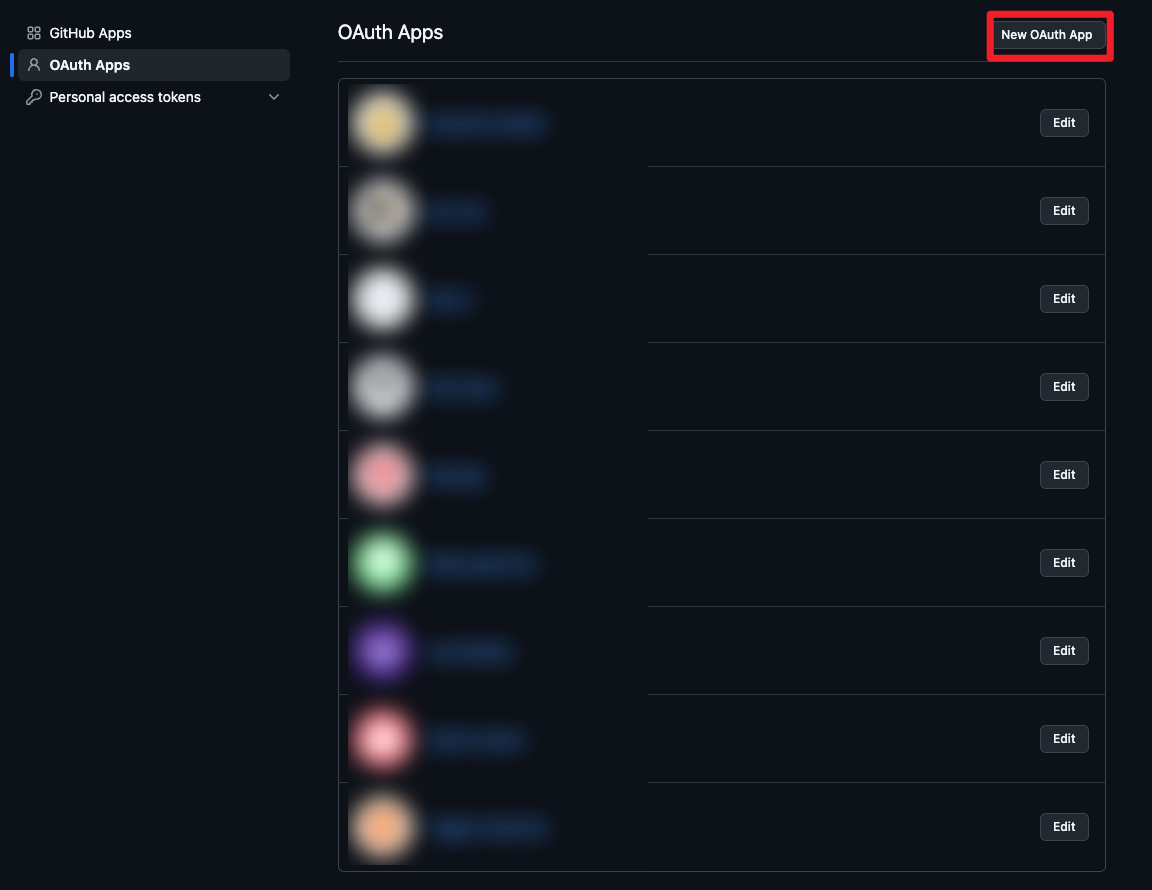
GitHub Settings → Developer settings → OAuth Apps → New OAuth App
URL: https://github.com/settings/applications/new
-
Configuration:
- Application name: anything descriptive (e.g., “Dify GitHub Trigger”)
- Homepage URL: your Dify console URL
- Authorization callback URL:
-
Capture the generated Client ID and Client Secret.
-
Adjust scopes if needed; the plugin defaults to , which allows webhook management without full repo access.
- Enter credentials in Dify (Administrator)
- For OAuth:
- : from the OAuth App.
- : from the OAuth App.
- (optional): keep the default unless additional GitHub APIs are required.
- For Personal Access Token:
- : paste the PAT; ensure it has the repository hook permissions mentioned above.
- User: Create a subscription
- Click Authorize (OAuth) or ensure a PAT is configured; the plugin will retrieve repositories the authenticated account can administer.
- Select the target from the dropdown (format ).
- Choose one or more webhook . Defaults cover most repository-level activities; you can narrow the list to reduce noise.
- (Optional) Provide if you maintain the webhook manually. If Dify provisions the webhook, a secret is generated automatically and stored with the subscription.
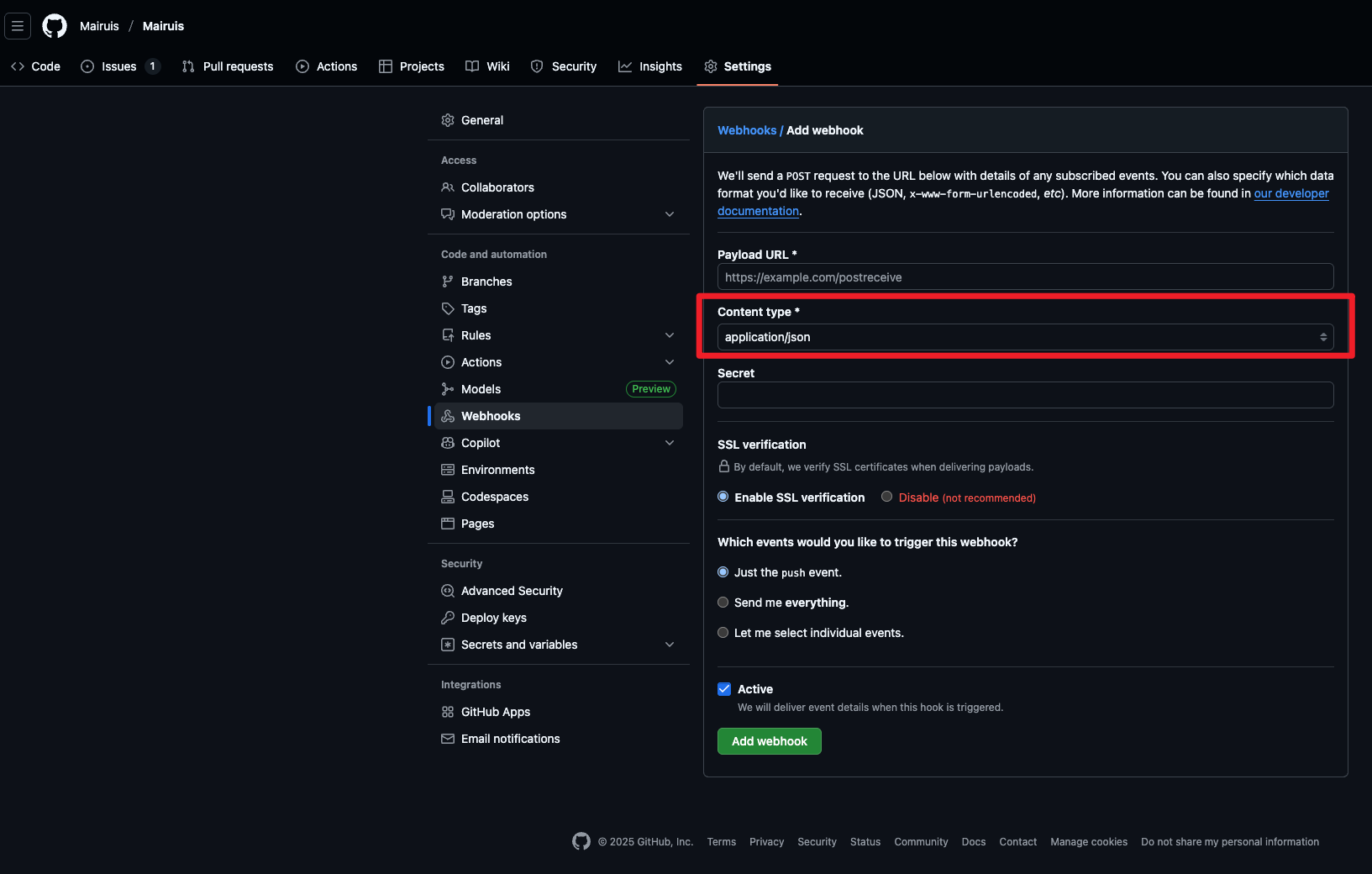
- Manual webhook setup: under GitHub → Repository Settings → Webhooks, set Content type to . The trigger only accepts raw JSON payloads () and will reject .
- Save the subscription. Dify shows the webhook endpoint URL () for manual setups or diagnostics.
What happens automatically
- The plugin calls GitHub’s API to create (or later delete) the webhook, using JSON payloads with and the shared secret.
- Webhook secrets are generated with UUID4 hex strings when not supplied, enabling HMAC SHA-256 signature verification () on every delivery.
- Subscription refresh extends the webhook TTL (~30 days) so GitHub keeps it active without reauthorization.
- On unsubscribe, the webhook is removed via .
Supported Events (high-level)
- , , , and related review/comment events.
- CI/CD and automation: , , , , , .
- Repository activity: , (create/delete), , , , , , .
- Project and collaboration: , , , , , , , .
- Security and quality: , , , .
- Configuration and governance: , , , .
How It Works
- Dispatch
- Validates the webhook signature if a secret is present.
- Parses JSON (or in form-encoded requests) and captures .
- Maps GitHub events to concrete Dify event names (e.g., → , → ).
- Returns a JSON response so GitHub considers the delivery successful.
- Events
- Each event YAML loads the stored payload, highlights the most relevant fields, and exposes them as structured outputs for downstream workflows.
- Action-based events (e.g., release published) are split to keep automation clear and deterministic.
Troubleshooting
- Webhook creation fails: confirm the OAuth token or PAT has scope and that the actor is an admin on the repository.
- “Missing webhook signature”: either supply the secret in the subscription form (for manual webhooks) or let Dify recreate the webhook.
- No events arriving: check that your Dify endpoint is publicly reachable (status 200) and that selected events match the GitHub activity you expect.
- 401/403 responses: re-authorize the plugin; revoked tokens or expired PATs must be replaced.
References
- GitHub Webhooks: https://docs.github.com/webhooks
- OAuth Apps: https://docs.github.com/apps/oauth-apps
- Event payloads: https://docs.github.com/webhooks-and-events/webhooks/webhook-events-and-payloads
CATEGORY
Trigger
TAGS
UTILITIES
VERSION
1.4.2
langgenius·12/22/2025 01:23 AM
REQUIREMENTS
LLM invocation
Tool invocation
Maximum memory
1MB