

Automatically create database schema knowledge base to build RAGs. Nodes containing natural language to SQL functionality based on schemaRAG
SchemaRAG Database Schema RAG Plugin


Author: joto
Version: 0.1.6
Type: tool
Repository: https://github.com/JOTO-AI/SchemaRAG-dify-plugin

Overview
SchemaRAG is a database schema RAG plugin designed specifically for the Dify platform. It can automatically analyze database structures, build knowledge bases, and implement natural language to SQL queries. This plugin provides a complete database schema analysis and intelligent query solution, ready to use out of the box.
Example workflow download
✨ Core Features
- Multi-Database Support: MySQL, PostgreSQL, MSSQL, Oracle, DM (达梦), automatic syntax adaptation
- Schema Auto-Analysis: One-click data dictionary generation, structure visualization
- Knowledge Base Upload: Automatic upload to Dify, supports incremental updates
- Natural Language to SQL: Ready to use out of the box, supports complex queries
- AI Data Analysis: Analyze query data, supports custom rules
- Data Visualization: Provides visualization tools, LLM recommends charts and fields
- Security Mechanism: SELECT-only access, supports field whitelist, minimum privilege principle
- Flexible Support: Compatible with mainstream large language models
📋 Configuration Parameters
| Parameter Name | Type | Required | Description | Example |
|---|---|---|---|---|
| Dataset API Key | secret | Yes | Dify knowledge base API key | dataset-xxx |
| Database Type | select | Yes | Database type MySQL/PostgreSQL/MSSQL/Oracle/DM | MySQL |
| Database Host | string | Yes | Database host/IP | 127.0.0.1 |
| Database Port | number | Yes | Database port | 3306/5432 |
| Database User | string | Yes | Database username | root |
| Database Password | secret | Yes | Database password | ****** |
| Database Name | string | Yes | Database name | mydb |
| Dify Base URL | string | No | Dify API base URL |
Supported Database Types
| Database Type | Default Port | Driver | Connection String Format |
|---|---|---|---|
| MySQL | 3306 | pymysql | |
| PostgreSQL | 5432 | psycopg2-binary | |
| Microsoft SQL Server | 1433 | pymssql | |
| Oracle | 1521 | oracledb | |
| DM Database (达梦) | 5236 | dm+pymysql |
🚀 Quick Start
Method 1: Command Line
Method 2: Dify Plugin Integration
-
Fill in the above parameters in the Dify platform plugin configuration interface
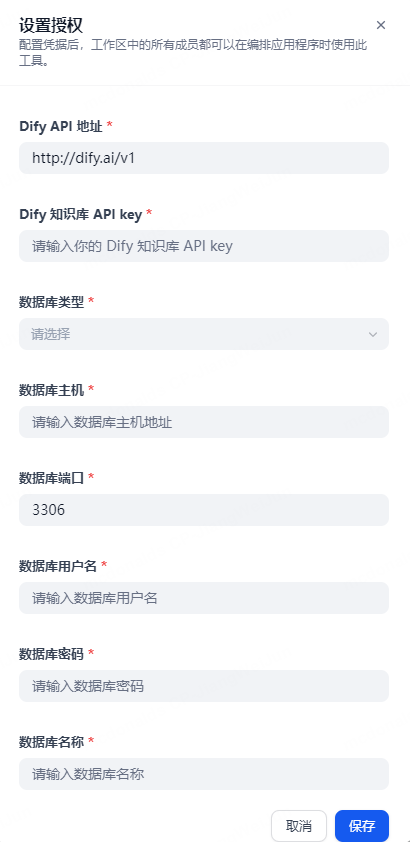
-
After configuration is complete and accurate, click save to automatically build the configured database schema knowledge base in Dify
-
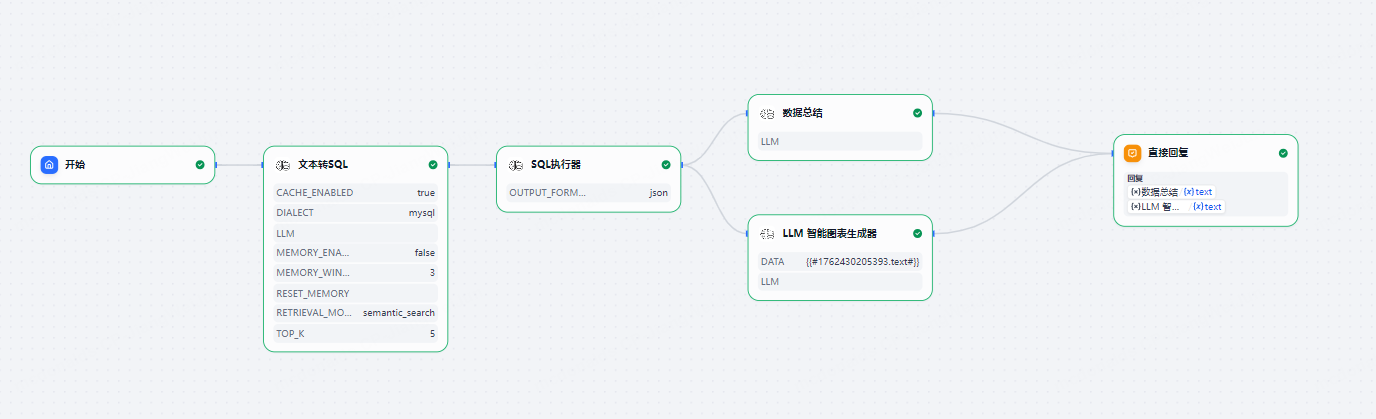
Add tools in the workflow and configure the knowledge base ID that was just created (the knowledge base ID is in the URL of the knowledge base page)
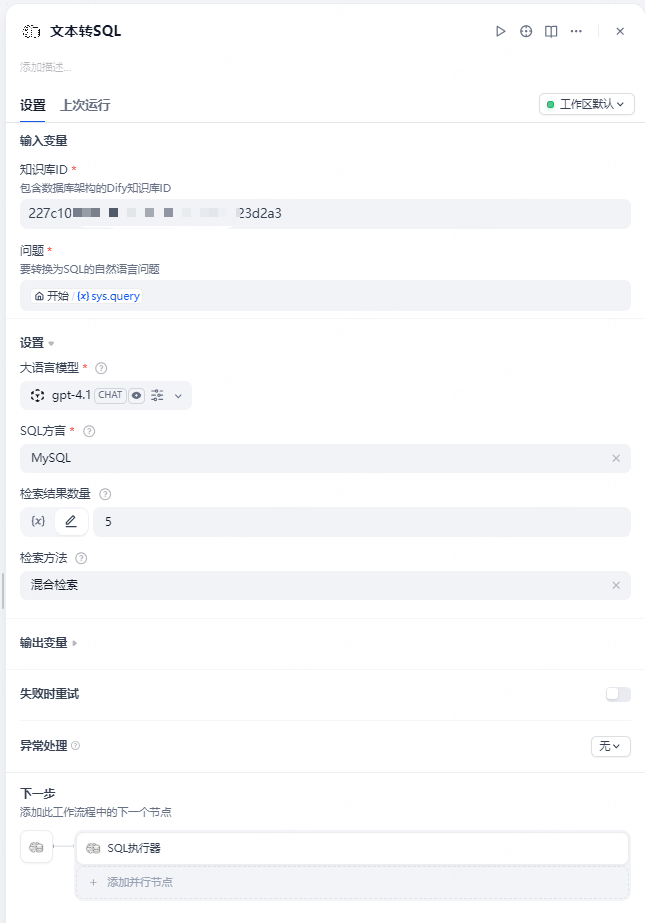
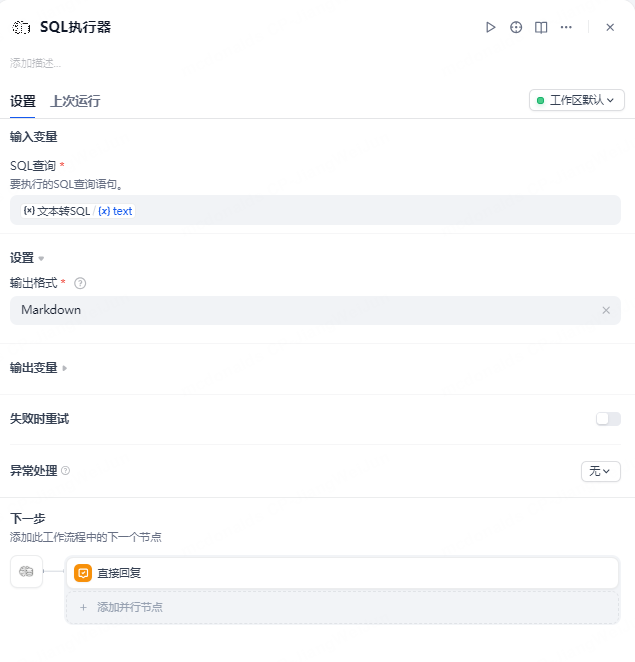
-
Provide SQL execution tool, input the generated SQL for direct execution, supports markdown and json output
Method 3: Code Invocation
🛠️ Tool Components
1. text2sql Tool
Natural Language to SQL Query Tool - Convert natural language questions to SQL queries using database schema knowledge base
Core Features
- Intelligent Query Conversion: Automatically convert natural language questions to accurate SQL query statements
- Multi-Database Support: Supports MySQL, PostgreSQL, MSSQL, Oracle, and DM SQL dialects
- Knowledge Base Retrieval: Intelligent retrieval and matching based on database schema knowledge base
- Ready to Use: Can be used directly after configuring the knowledge base, no additional setup required
- Customize propt rules: Add custom to prompt words and configure custom rules
Parameter Configuration
| Parameter | Type | Required | Description |
|---|---|---|---|
| dataset_id | string | Yes | Dify knowledge base ID containing database schema |
| llm | model-selector | Yes | Large language model for SQL generation |
| content | string | Yes | Natural language question to convert to SQL |
| dialect | select | Yes | SQL dialect (MySQL/PostgreSQL/MSSQL/Oracle/DM) |
| top_k | number | No | Number of results to retrieve from knowledge base (default 5) |
2. sql_executer Tool
SQL Query Execution Tool - Safely execute SQL queries and return formatted results
Core Features
- Safe Execution: Only supports SELECT queries to ensure data security
- Output Control: Provides interface to control maximum query rows to prevent excessive data queries
- Multi-Format Output: Supports JSON and Markdown output formats
- Direct Connection: Direct database connection for query execution, real-time results
- Error Handling: Comprehensive error handling mechanism with detailed error information
Parameter Configuration
| Parameter | Type | Required | Description |
|---|---|---|---|
| sql | string | Yes | SQL query statement to execute |
| output_format | select | Yes | Output format (JSON/Markdown) |
| max_line | int | No | Maximum number of query rows (default 1000) |
3. sql_executer_cust Tool
Custom SQL Query Execution Tool - Custom database connection and safely execute SQL queries to return formatted results
Core Features
- Custom Database Connection: Supports multiple databases without plugin configuration
- Safe Execution: Only supports SELECT queries to ensure data security
- Output Control: Provides interface to control maximum query rows to prevent excessive data queries
- Multi-Format Output: Supports JSON and Markdown output formats
- Direct Connection: Direct database connection for query execution, real-time results
- Error Handling: Comprehensive error handling mechanism with detailed error information
Parameter Configuration
| Parameter | Type | Required | Description |
|---|---|---|---|
| database_url | string | Yes | Database connection URL |
| sql | string | Yes | SQL query statement to execute |
| output_format | select | Yes | Output format (JSON/Markdown) |
| max_line | int | No | Maximum number of query rows (default 1000) |
Database connection URL examples:
- mysql: mysql://user:password@host:port/dbname
- postgresql: postgresql://user:password@host:port/dbname
- DM: dameng://user:password@host:port/dbname
- mssql: mssql://user:password@host:port/dbname
- oracle: oracle://user:password@host:port/dbname
4. text2data Tool (recommend)
Natural Language to Data Query Tool - Integrates text2sql and sql_executer functionality for one-stop conversion from questions to data
Core Features
- End-to-End Query: Convert natural language questions directly to query results without intermediate steps
- Multi-Database Support: Supports MySQL, PostgreSQL, MSSQL, Oracle, and DM databases
- Smart Output: Supports JSON, Markdown, and Summary output formats
- SQL Auto-Repair: Experimental feature that automatically analyzes and fixes SQL errors when execution fails (requires enablement)
- Safe Execution: Built-in SQL security policies to prevent dangerous operations
- Optimized Experience: Uses tags to fold intermediate processes, with clear result display
Parameter Configuration
| Parameter | Type | Required | Description |
|---|---|---|---|
| dataset_id | string | Yes | Dify knowledge base ID containing database schema, supports multiple IDs separated by commas |
| llm | model-selector | Yes | Large language model for SQL generation and analysis |
| content | string | Yes | Natural language question to convert to SQL |
| dialect | select | Yes | SQL dialect (MySQL/PostgreSQL/MSSQL/Oracle/DM) |
| output_format | select | Yes | Output format (JSON/Markdown/Summary) |
| top_k | number | No | Number of results to retrieve from knowledge base (default 5) |
| max_rows | number | No | Maximum number of rows to return (default 500, prevents excessive data) |
| example_dataset_id | string | No | Example knowledge base ID, can provide SQL examples to improve generation quality |
| enable_refiner | boolean | No | Enable SQL auto-repair feature (experimental, default false) |
| max_refine_iterations | number | No | Maximum SQL repair attempts (1-5, default 3) |
SQL Auto-Repair Feature (Experimental)
When is enabled, if the generated SQL execution fails, the system will:
- Auto-Analyze Errors: Capture database error messages and specific causes
- Intelligent Repair: Use LLM to analyze errors and generate repaired SQL
- Iterative Optimization: Support up to N repair attempts (configurable)
- Transparent Process: Display repair process within tags
Repair Scenario Examples:
- ✅ Column name spelling errors (e.g., → )
- ✅ Table name does not exist or is incorrect
- ✅ JOIN condition errors
- ✅ Data type mismatches
- ✅ Syntax errors (dialect-specific syntax)
Usage Recommendations:
- 🧪 Experimental feature,Enabling it will increase the consumption of tokens additionally.
- 📝 Better results in complex Schema scenarios
- ⚡ Adds 2-10 seconds to response time
- 💰 Each repair consumes approximately 2000-3000 tokens
5. data_summary Tool
Data Summary Analysis Tool - Intelligent data content analysis and summarization using large language models
Analysis Capabilities
- Custom Rules: Supports user-defined analysis rules and guidelines
- Smart Data Format Recognition: Automatically identifies JSON and other data formats for optimized processing
- Performance Optimized: Cached common configurations to reduce response time
Configuration Options
| Parameter | Type | Required | Description |
|---|---|---|---|
| data_content | string | Yes | Data content to be analyzed |
| llm | model-selector | Yes | Large language model for analysis |
| query | string | Yes | Analysis query or focus area |
| custom_rules | string | No | Custom analysis rules |
| user_prompt | string | No | Custom prompt |
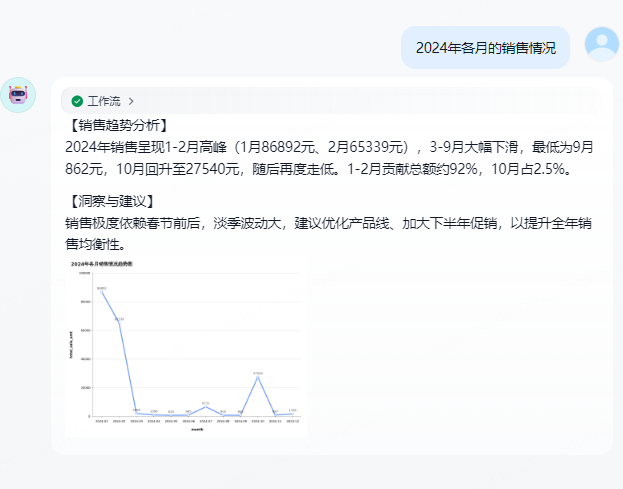
6. llm_chart_generator Tool
LLM Intelligent Chart Generation Module - Based on large language models to recommend chart types and fields, using antv to render charts, providing highly maintainable end-to-end chart solutions
Features
- Intelligent Analysis: Automatically analyzes user questions and data, intelligently selects the most suitable chart type
- Multi-Chart Support: Supports mainstream charts such as bar charts, line charts, pie charts, scatter plots, histograms
- High Maintainability: Modular design with clear interfaces, easy to extend and maintain
- Unified Standards: Chart configuration uses standardized JSON format for easy integration and parsing
- Fallback Solutions: Automatically falls back to table display when chart generation fails
- Configuration Validation: Comprehensive configuration validation and error handling mechanisms to ensure stability
Configuration Options
| Parameter | Type | Required | Description |
|---|---|---|---|
| user_question | string | Yes | User question describing the chart type and requirements (e.g., sales trends, market share) |
| data | string | Yes | Data for visualization, supports JSON, CSV, or structured data |
| llm | model-selector | Yes | Large language model for analysis and chart generation |
| sql_query | string | Yes | SQL query statement used to recommend charts and fields |
❓ FAQ
Q: Which databases are supported?
A: Currently supports MySQL, PostgreSQL, MSSQL, Oracle, and DM (达梦).
Q: Is the data secure?
A: The plugin only reads database structure information to build Dify knowledge base. Sensitive information is not uploaded.
Q: How to configure the database?
A: Configure database and knowledge base related information in the Dify plugin page. After configuration, it will automatically build the schema knowledge base in Dify.
Q: How to use the text2sql tool?
A: After configuring the database and generating the schema knowledge base, you need to obtain the dataset_id from the generated knowledge base URL and fill it into the tool to specify the indexed knowledge base, and configure other information to use it.
Q: What data formats does the data_summary tool support?
A: Supports multiple data formats including text and JSON. The tool automatically recognizes and optimizes processing. Supports data content up to 50,000 characters.
Q: How to use custom rules?
A: You can specify specific analysis requirements, focus points, or constraints in the custom_rules parameter, supporting up to 2,000 characters.
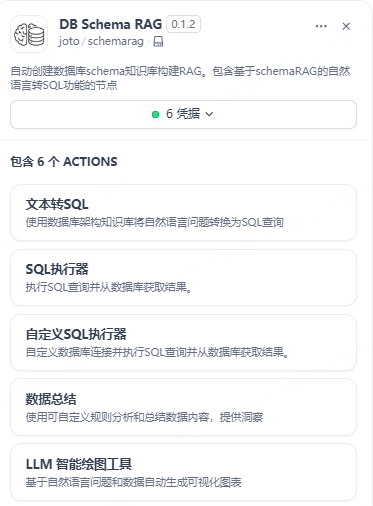
📸 Example Screenshots
📞 Contact
- Developer: Dylan Jiang
- Email: [email protected]
📄 License
Apache-2.0 license