

Two plugins,One is the Hallucination controllable Text2SQL component,the other is the fast response ChatBI.
English
Overview
DataFocus includes two tools, FocusSQL and FocusGPT. FocusSQL is the Hallucination controllable Text2SQL component,FocusGPT is the fast response ChatBI.
There are already so many Text-to-SQL frameworks. Why do we still need another one?
In simple terms, FocusSQL adopts a two-step SQL generation solution, which enables control over the hallucinations of LLM and truly builds the trust of non-technical users in the generated SQL results.
Below is the comparison table between FocusSQL and others:
Comparison Analysis Table
Here’s a side-by-side comparison of DataFocus plugin with other LLM-based frameworks:
| Feature | Traditional LLM Frameworks | FocusSQL |
|---|---|---|
| Generation Process | Black box, direct SQL generation | Transparent, two-step (keywords + SQL) |
| Hallucination Risk | High, depends on model quality | Low, controllable (keyword verification) |
| Speed | Slow, relies on large model inference | Fast, deterministic keyword-to-SQL |
| Cost | High, requires advanced models | Low, reduces reliance on large models |
| Non-Technical User Friendliness | Low, hard to verify results | High, easy keyword checking |
The following will introduce how to configure and an example demonstration.
1. Apply for DataFocus Token
If you don't have the DataFocus application yet, please apply for one on the DataFocus Website.
Log in to your DataFocus application. Click Admin > Interface Authentication > Bearer Token > New Bearer Token, to create a new token and get the token value.
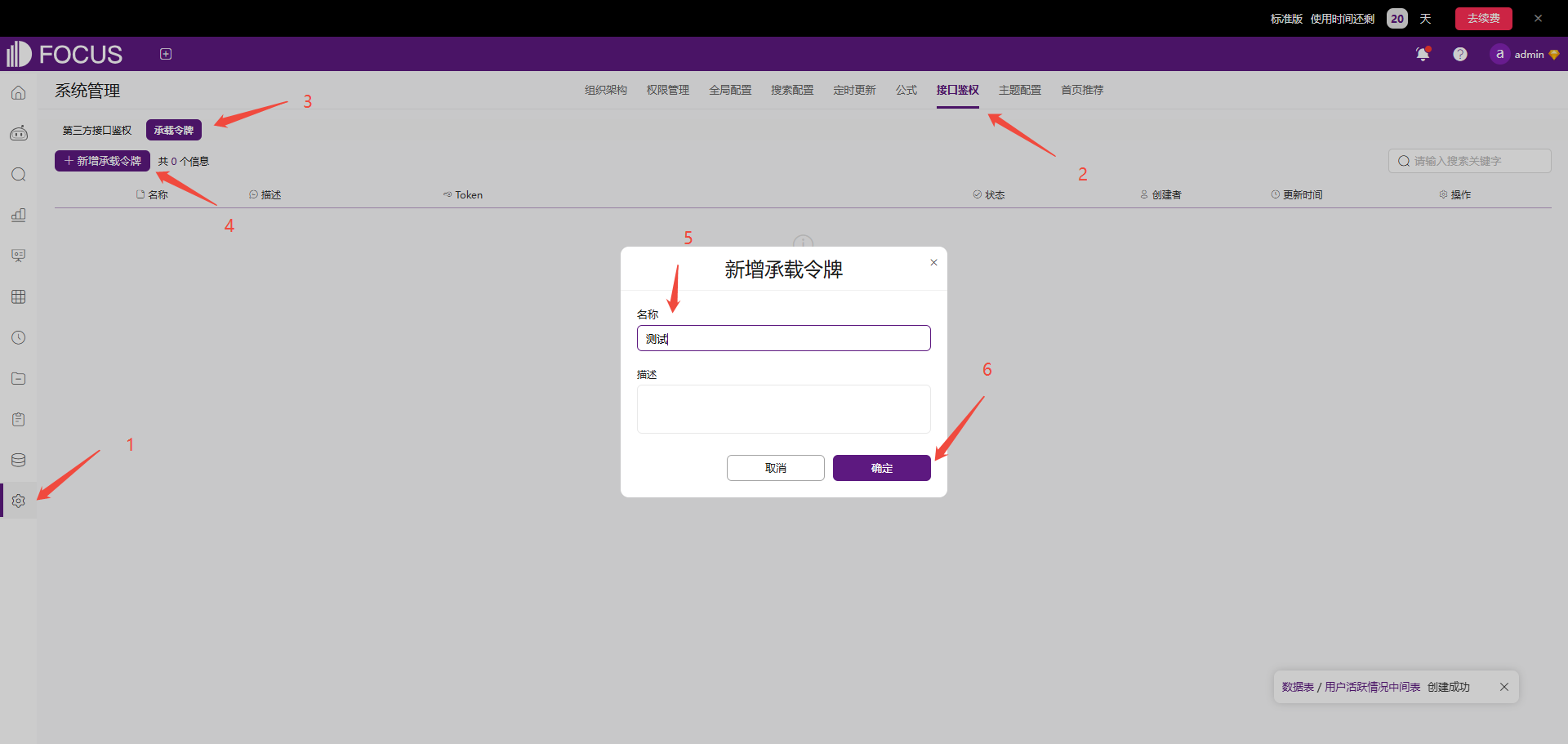
If you have a DataFocus private deployment environment, you can get Token on your own environment.
2. Fill in the configuration in Dify
Install DataFocus from Marketplace and fill token and host in the authorization page.Token is the value obtained in the previous step.If you have a DataFocus private deployment environment, host is your environment host. Otherwise, the SAAS environment address can be used by default.
3. Use the tool
DataFocus includes two tools, FocusSQL and FocusGPT.
FocusSQL
FocusSQL is a natural language to SQL plugin based on keyword parsing.
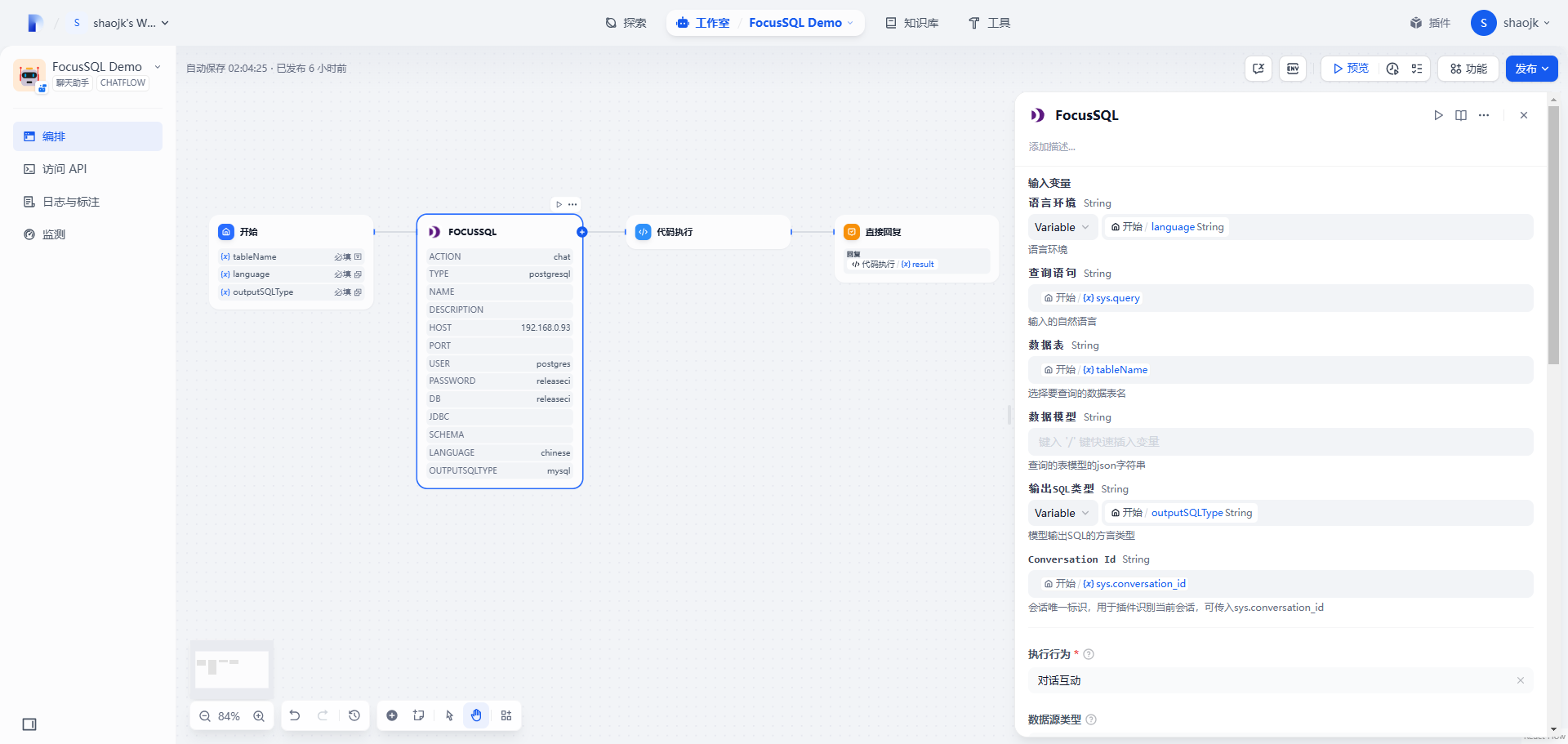
Output Variable JSON
| Name | Type | Description |
|---|---|---|
| content | string | Generated SQL statements |
| question | string | Generated keywords |
| type | string | Return type |
Output Example
FocusGPT
FocusGPT is an intelligent query plugin that supports multiple rounds of conversations, which allow you query data from your database.
FocusGPT not only can return query SQL but also return query result to you.
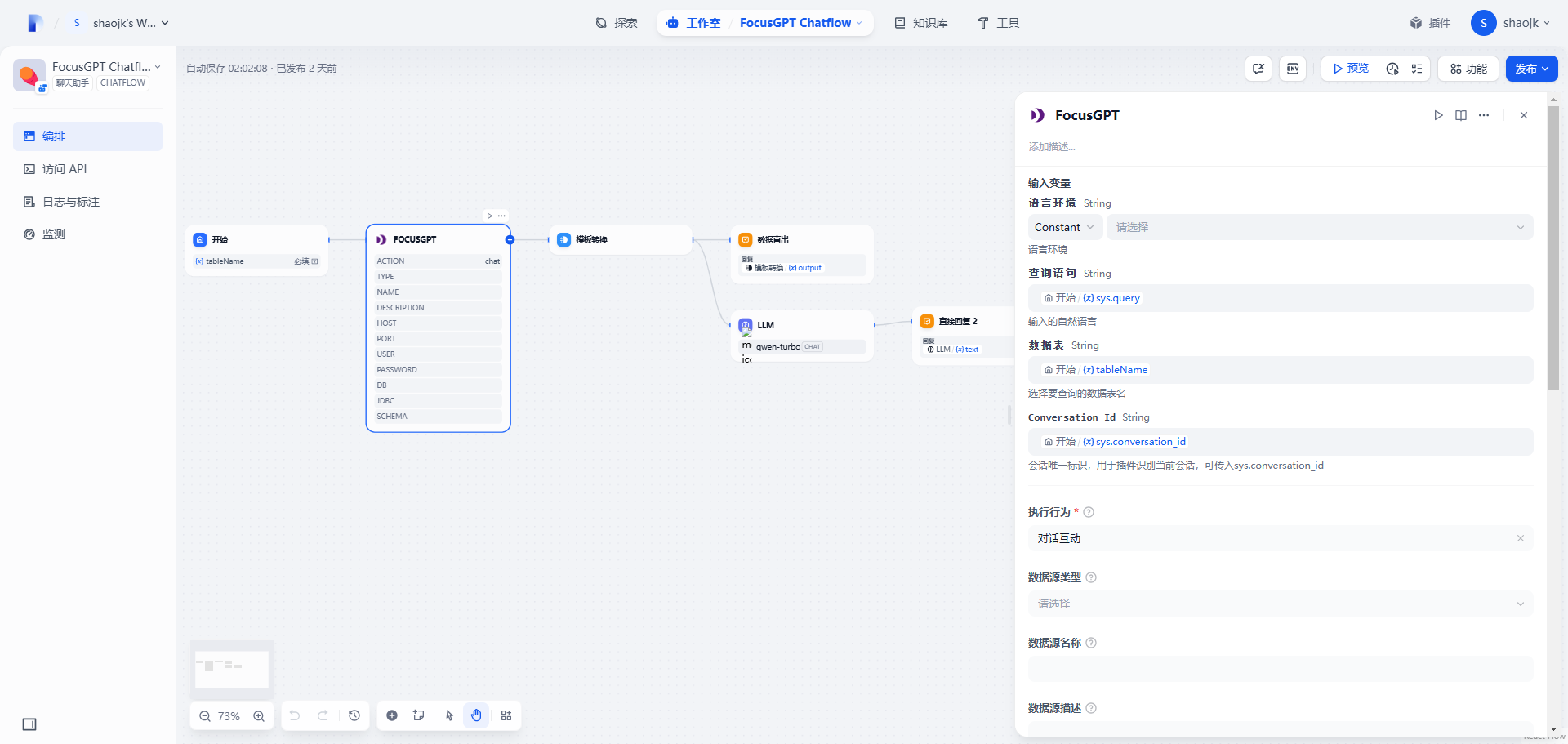
Output Variable JSON
| name | type | Description |
|---|---|---|
| code | number | Status code |
| columns | [[object]] | Two-dimensional array storing query results |
| count | number | Number of rows returned |
| duration | string | Query execution time, in seconds (s) |
| headers | [object] | Column header information for the two-dimensional array columns |
| » display | string | Display name of the column header |
| » name | string | Original column name of the header |
| » suf | string | Prefix of the column header, indicating aggregation method |
| sql | [object] | SQL corresponding to the query data |
| »select_clause | string | SQL corresponding to the query data |
| title | string | Keywords generated from parsing |
Output Example
Configuration
FocusSQL and FocusGPT have similar configuration. Below are the functions and usage instructions of each parameter
| Parameter | Description |
|---|---|
| Language | Language environment, only support Chinese and English |
| Query Statement | Natural language input by users |
| Table Name | Target data table for query |
| Data Model | Custom model parameter entry |
| Output SQL Type | Output SQL Type |
| Conversation Id | Unique identifier of the session, which allow tool identify and maintain session state |
| Action | The behavior of tool execution currently includes two types: obtaining table lists and dialogues |
| Datasource Type | Types of external data sources connected. If datasource type was selected, the connection parameters below need to be filled in |
| Host | host |
| Port | port |
| DB user | user |
| DB Password | password |
| Database Name | database name |
| JDBC | JDBC |
| Schema | Schema name |
Model Parameters
The data model needs to pass in a JSON string, and the structure of the model is as follows
Structure
| Name | Type | Required | Description |
|---|---|---|---|
| type | string | Yes | Database type |
| version | string | Yes | Database version, eg: 8.0 |
| tables | [object] | Yes | Table structure list |
| » tableDisplayName | string | No | Table display name |
| » tableName | string | No | Original table name |
| » columns | [object] | No | Columns structure list |
| »» columnDisplayName | string | Yes | Column display name |
| »» columnName | string | Yes | Original column name |
| »» dataType | string | Yes | Column data type |
| »» aggregation | string | Yes | Column default aggregation |
| relations | [object] | Yes | Association relationship list |
| » conditions | [object] | No | Associated conditions |
| »» dstColName | string | No | Dimension original column name |
| »» srcColName | string | No | Fact original column name |
| » dimensionTable | string | No | Dimension original table name |
| » factTable | string | No | Fact original table name |
| » joinType | string | No | Association type |
Parameter values
type
| DataBase | Value |
|---|---|
| MySQL | mysql |
| ClickHouse | clickhouse |
| Impala | impala |
dataType
| DataType | Value |
|---|---|
| Boolean | boolean |
| Integer | int |
| Long integer | bigint |
| Float | double |
| String | string |
| Timestamp | timestamp |
| Date type | date |
| Time type | time |
aggregation
| Aggregation | Value |
|---|---|
| Sum | SUM |
| Mean | AVERAGE |
| Min | MIN |
| Max | MAX |
| Count | COUNT |
| Number of deduplicates | COUNT_DISTINCT |
| Variance | VARIANCE |
| Standard deviation | STD_DEVIATION |
| None | NONE |
joinType
| Assocation | Value |
|---|---|
| Left association | LEFT JOIN |
| Right association | RIGHT JOIN |
| Internal | INNER JOIN |
| Fully associative | FULL JOIN |
Example
model
Consult
